

Webinar Promotion Through Meta Ads: Complete Funnel Guide
Budget a webinar funnel with explicit registration and attendance assumptions, verify handoffs and permission, and evaluate mature qualified sales.
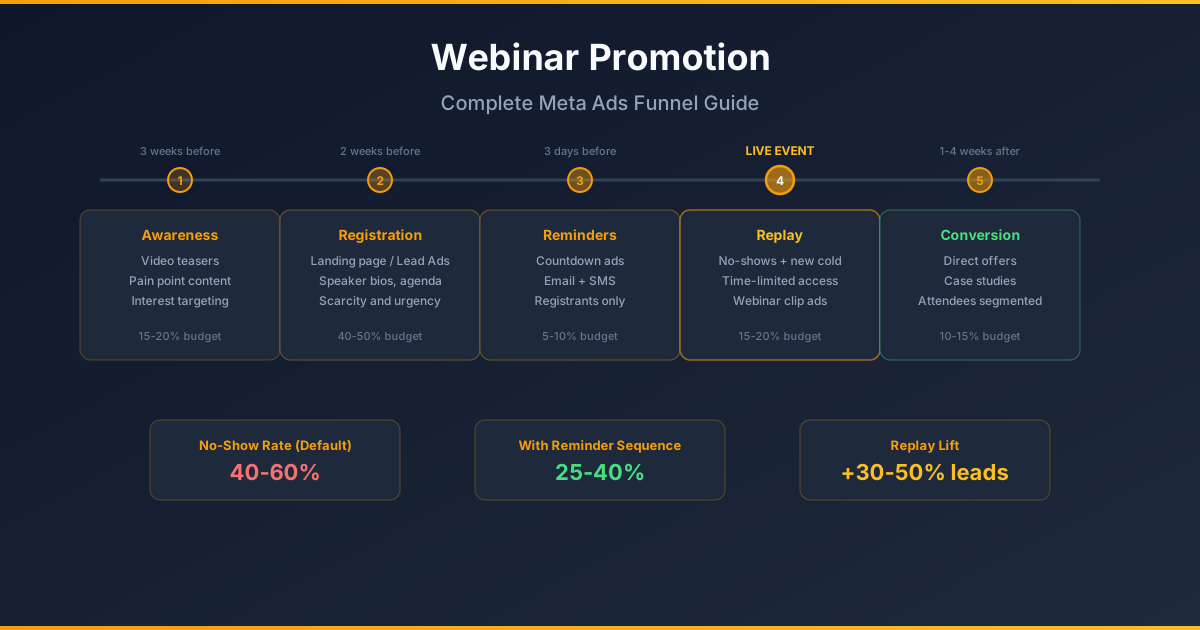
A webinar plan should explain what attendees can learn and connect promotion to qualified, profitable customers. Registration, attendance and replay views are separate outcomes. Build a budget that sums to the actual affordable envelope, then label every forecast assumption.
A budget that totals 100%
| Candidate phase | Synthetic allocation | Gate |
|---|---|---|
| Topic introduction | $100 / 10% | Real educational material and approved speaker rights |
| Registration | $500 / 50% | Working form, event details and delivery handoff |
| Optional reminder ads | $50 / 5% | Permitted audience source and supported controls |
| Replay promotion | $150 / 15% | Working replay, rights and truthful availability |
| Qualified next step | $200 / 20% | Relevant offer and consistent sales follow-up |
| Total | $1,000 / 100% | Combined spend and cash-loss caps approved |
This is a fictional plan, not recommended universal shares. Some phases may be unnecessary. At an assumed $10 per registration, $500 buys 50 expected registrations; at assumed 60% attendance, 30 attend; at assumed 20% qualified-opportunity share, six qualify; at assumed one-third close rate, two pay. Those assumptions do not predict actual outcomes or demonstrate a sufficient sample.
Reconcile registration and attendance records
- Submit a synthetic registration through each capture path. Verify unique registration ID, event/version, contact fields, permission record, source and timestamps.
- Confirm receipt in the webinar system and intended operational record. A success page alone does not prove the registration arrived.
- Reconcile source registrations, delivered unique records, rejected/missing records and duplicates. Record retry ownership; replaying a failed transfer must not create another person.
- Match actual attendance using the declared identity and attendance definition, with unresolved joins labeled unknown. A reminder click is not attendance and no record is not automatically absence.
- Keep email/SMS permission and withdrawal status separate from paid-audience eligibility. Verify provider capability and applicable contact requirements before sending messages.
Use reminders without promising ad order
Stop wasting ad budget
NovaStorm AI cuts Meta Ads CPA by 30% on average. No complex setup required.
| Proposed time | Permitted channel | Truthful message/check |
|---|---|---|
| Day before | Approved email or optional eligible advertising | State actual date, time zone and agenda |
| Two hours before | Email; SMS only with appropriate permission | Working personal join path and exact start time |
| At start | Optional approved service reminder | Only say "live now" while the event is actually live |
| After event | Approved replay notice or eligible ad | Publish actual replay availability and rights |
These reminders are a proposed operational schedule. Meta ads do not guarantee every registrant receives each message or sees them in this order. Use current audience controls and record matching/update delays. Stop registration advertising when registration actually closes; do not target "non-attendees" before the event has ended and attendance has been reconciled.
Continue to mature sales and contribution
In the synthetic model, two customers at $400 contribution each produce $800 before acquisition. Against $1,000 media spend, the remainder is −$200 before webinar production and sales costs. A cheap registration or full room does not fix those economics. Include all costs and refunds, and compare unique customer cohorts at the same follow-up age.
- Define a qualified lead from actual service fit, need and permissible follow-up. Attendance alone is not qualification.
- Set sales observation through the actual deal/payment/refund delay and distinguish paid, pending and lost opportunities.
- Use feasible controlled assignment for an incremental advertising claim; otherwise label the webinar outcomes associated or attributed.
- Approve sample feasibility, spend/cash-loss limits and a review date. Preserve inconclusive results and stop when the risk limit or event promise fails.
NovaStorm can prepare the truthful speaker, registration and replay briefs as paused campaign and local ad-set drafts for user approval. Webinar registration transfer, attendance syncing and email/SMS delivery require separately verified systems. The workflow does not claim NovaStorm sends reminders or automatically qualifies attendees.
Published by NovaStorm AI. Planning examples are illustrative assumptions, not measured customer results.
Disclaimer: This article was generated with the assistance of AI and reviewed by the NovaStorm AI team. While we strive for accuracy, we recommend verifying specific data points and consulting official sources (linked where available) for critical business decisions.
Ready to automate your Meta Ads?
NovaStorm AI takes full responsibility for your campaigns — from monitoring to optimization.
Start NowMore on B2B and lead generation
B2B Lead Generation on Meta: Enterprise Funnel and Measurement Plan
Plan a B2B content-to-demo funnel, distinguish pipeline forecasts from closed revenue and set Meta acquisition limits around mature sales and cash.

Messenger Ads: Offer, Human Handoff and Paid-Outcome Review
Plan a Messenger ad offer with account eligibility checks, a human handoff queue and mature paid-outcome measurement instead of conversation-price benchmarks.
Lead Quality on Meta: Diagnose Forms and Sales Outcomes
Define lead quality consistently, check available form options and consent, and compare friction with reachable qualified leads and mature sales.
B2B Targeting on Meta Ads: Plan Qualified Leads and Paid Deals
Design B2B Meta targeting around qualification, mature deals and contribution, with an explicit decision when cheap leads do not close.